Chart Options Window

CONTROL-O hotkey
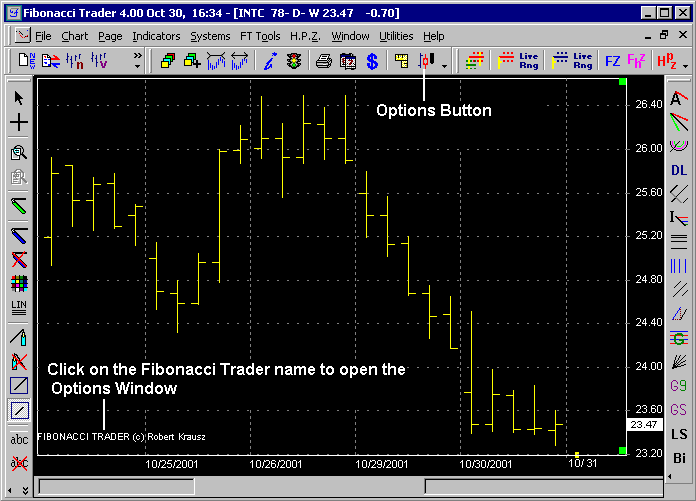
To access the Chart Options Box click on the options button or on the Fibonacci Trader name that is on the chart. You can also right click the chart, click chart then open options. Using the keyboard press CONTROL-O.
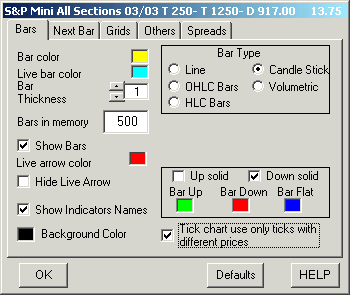
BARS TAB
Bar Color - change the color of the bars.
Live bar color - change the color of the real time bar during market hours..
Live arrow color - change the color of the arrow that points to the latest price.
Hide Live Arrow - hides the live arrow.
Bar Thickness - changes the thickness of the bars.
Bars in Memory - this is the maximum number that the program will keep in memory at any time on the selected chart.
Show Indicators Names - when checked all indicator names in use will show on the chart. You can click on the indicator name on a chart to open the indicator edit window.
Show Bars - if unchecked the bars will not show on the chart.
Background Color - used to change the background color.
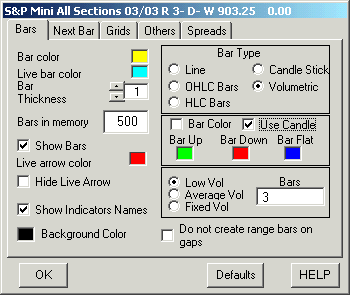
Bar Type - used to select a different bar type.
Line - a line connecting all closes.
Candle Stick - candle stick, you have options to change the colors and the way the bar is filled.
OHLC Bars - open, high, low, close bar.
HLC Bars - high, low, close bar.
Volumetric - volumetric bars, click here for more information.
The next 2 options are only on the real time version of the Fibonacci Trader.
If the chart is a tick chart you also will have the option Tick chart use only ticks with different prices, that means that in a 50 tick chart just ticks that have a different price from the previous tick will count.
If the chart is a range bar chart you also will have the option Do not create range bars on gaps, when checked the range bar chart will not create bars on gaps.
NEXT BAR TAB
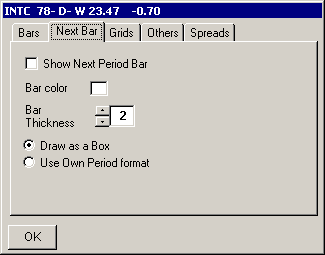
Show Next Bar - when selected the next period bar will be shown on the chart (ie. encapsulation).
Bar Color - changes the color for the next period bar.
Bar Thickness - change the thickness of the next period bar.
Draw as a Box - when selected the next period bar will be drawn as a box around the own period bars.
Use Own Period format - when selected the next period bar will be drawn using the same format as the own period bar.
GRIDS TAB
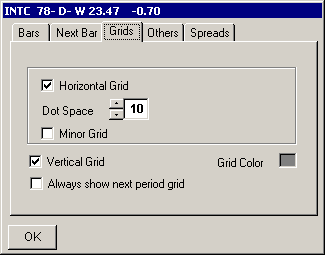
Horizontal Grid - select to show a horizontal grid on the chart.
Dot Space - change the space between each dot of the grid.
Minor Grid - select to have a minor grid division between grids.
Vertical Grid - select to show vertical grid.
Always show next period grid - when selected the vertical grid will always be at the end of a next period.
Grid Color - changes the grid color
OTHERS TAB
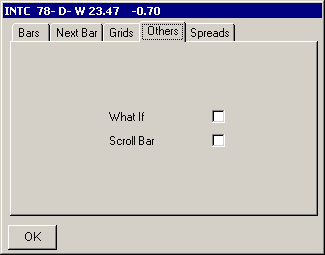
What if - if checked the program will assume that the symbol is closed even though it will still update and any indicator that depends on the close will be affected.
Scroll Bar - f checked show the scroll bar on the chart. You can also click on the green square in the upper right hand corner of any chart to activate the scroll bar.
SPREAD TAB
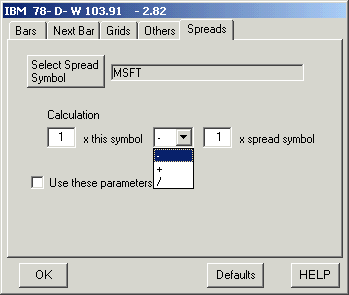
Select Spread Symbol - click to select the other chart you want to use for the spread. Note: the own period time frame must be the same.
You must check 'Use these parameters' to activate the spread.
Minor Grid - select to have a minor grid division between grids.
Vertical Grid - select to show vertical grid.
Always show next period grid - when selected the vertical grid will always be at the end of a next period.
Grid Color - changes the grid color.
Since 1992