Trend Line

Click on the Trend Line button , go to the chart, click where you want to start the trend line and drag it to where you want it to end.

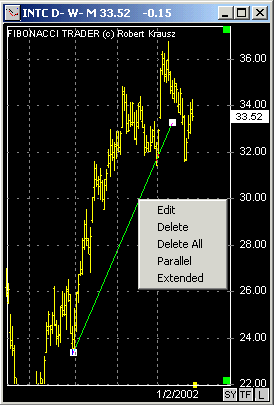
If you right click on a Trend Line you will see a menu with the options  edit, delete, delete all, parallel, and extend.

In the Trend Line Parameters window you can change the line color and thickness.


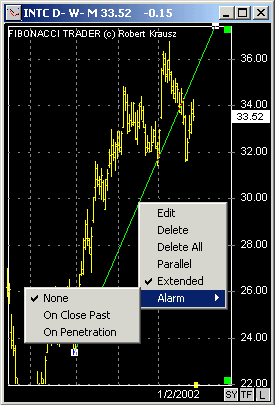
When you create an Trend Line with  the 'extend' option set to on a alarm will be available in the trend line right click menu.

You can set it alarm to initiate when a bar closes past the trend line or just crosses it. 


Trading any market carries a high level of risk, and may not be suitable for all investors. The high degree of leverage can work against you as well as for you. Before deciding to invest you should carefully consider your investment objectives, level of experience, and risk appetite. The possibility exists that you could sustain a loss of some or all of your initial investment and therefore you should not invest money that you cannot afford to lose. You should be aware of all the risks associated with trading, and seek advice from an independent financial advisor if you have any doubts.

* The Views and opinions represented in the provided website links and resources are not controlled by the introducer or the FCM.  Further, the introducer and the FCM are not responsible for their availability, content, or delivery of services.

Copyright © 1996-2001 Fibonacci Trader Corporation. Last updated: May 11, 2007 .  All names mentioned in this document are trademarks or registered trademarks of their respective owners.