INDICATOR of an INDICATOR
Version 4 you can calculate many indicators using other indicators’ values.
For Example:
Below we
have added the Moving Average of the Own period closing prices and the
Moving Average - Weighted of the Own period closing prices to the indicators
list.
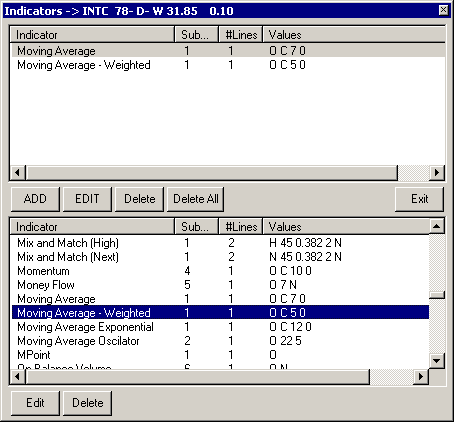
If you edit the MA-Weighted, the edit screen will look like:
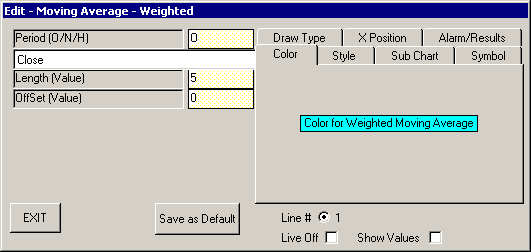
Note that in the white box you have the word “Close” which means the calculation defaults to the closing prices of the price bars in your chart. However, if you click on the white box a drop down menu appears giving you more options.
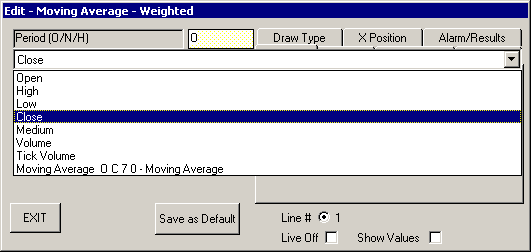
One of the options will be the “Moving Average O C 7 0” (the other indicator in the indicators list). If you click on “Moving Average O C 7 0” and then click the “Exit” button, your indicators list will now show:
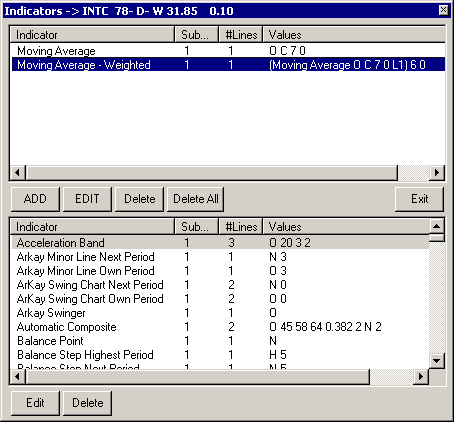
Note that the “Moving Average Weighted” is now based on the “Moving Average O C 7 0 L1”. “L1” means line number 1 of the indicator “Moving Average”( the moving average only calculates 1 line on the chart). On indicators that have more than one line you can select which line you want to use and the line in use will show as a L1 or L2 or L3.
The next picture shows the edit of a “Moving Average – Weighted” where there is the “Stochastics” indicator which has 3 lines that can be used.
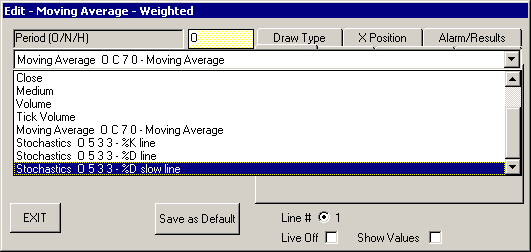
You can have an indicator of an indicator of an indicator, like a moving average of the RSI of the ADX line. The next chart is an example of this.

The Relative Strength Index uses the indicator (DI+/- ADX ADXR O 14 L3) where L3 is the ADX line of the indicator DI+/- ADX ADXR.
* Trading any market carries a high level of risk, and may not be suitable for all investors. The high degree of leverage can work against you as well as for you. Before deciding to invest you should carefully consider your investment objectives, level of experience, and risk appetite.
* The possibility exists that you could sustain a loss of some or all of your initial investment and therefore you should not invest money that you cannot afford to lose. You should be aware of all the risks associated with trading, and seek advice from an independent financial advisor if you have any doubts.
* The Views and opinions represented in the provided website links and resources are not controlled by the Referring Broker or the FCM. Further, the Referring Broker and the FCM are not responsible for their availability, content, or delivery of services.
* You should be aware of all the risks associated with foreign exchange, futures, stocks, options, Cryptocurrencies trading, and seek advice from an independent financial advisor if you have any doubts. We do not offer any advise and trade using our software is at your own risk.
Home | Privacy Policy | Contact Information
Copyright © 1996-2020 PAS Inc.
All names mentioned in this
document are trademarks or registered trademarks of their respective
owners.