Symbols Format Help
Interactive Brokers
SThere are 2 ways to enter the symbol for Interactive Brokers.
1. Specify the complete Symbol
The symbol format is
SYMBOL^TYPE^EXCHANGECODE^EXPIRATION^STRIKE^PUTCALL^CURRENCY(^LOCALEXCHANGESYMBOL^MULTIPLIER)
- SYMBOL is the symbol the you see on the UNDERLYING column on the IB TWS
- TYPE is STK for stocks, IND for indexes, FUT for futures, OPT for options, CASH for FOREX, CFD and CMDTY (version R58 or later) CFD example IBUS500^CFD^SMART but just real time data works on this type, no historical.
CMDTY example symbol XAUUSD^CMDTY^SMART
- EXCHANGE CODE it the code you see on the EXCHANGE column on the IB TWS
NOTE NEW EXCHANGECODE FORMAT FOR VERSION 4.10 R21 or later, EXCHANGE~PRIMARYEXCHANGE
Symbols like GLD need now to define the main and primary exchange, that is done using the ~ separating the 2 exchanges symbols, then for GLD that is a SMART and primary is ARCA the symbol will be
GLD^STK^SMART~ARCA note the primary exchange code is not needed on most of the symbols, just the exchange.
- EXPIRATION is YYYYMM of the future or option expiration
- STRIKE for options type the strike price.
- PUTCAL for options type a P for put or C for cal.
- CURRENCY for FOREX type other currency on the pair.
- LOCAL EXCHANGE SYMBOL (IF NEEDED) - some symbols (the underlying on IB) can have more than 1 exchange symbol, this option was added on version R86 or later.
- MULTIPLIER (Added on version 4.0 r103 or later) - Some contracts need to have the multiplier information, like Silver Futures, can be 1000 or 5000, symbol for Silver December 2013 1000 multiplier will be SI^FUT^NYMEX^201312^^^^^1000
-Note that some symbols on exchanges are not in the USA will need to use all symbol information like the SPI on SFE it will be SPI^FUT^SNFE^200812^^^AUD
EXAMPLES
Note we use the character ^ between fields.
For IBM stock you will have
IBM^STK^SMART
For the S&P Mini March 03
ES^FUT^GLOBEX^200303
For the Russell at NYBOT 2009/03 IB change the symbol back to the old format, use FT^FUT^NYBOT^200903, do not use RUT symbol anymore.
For option Strike will be a strike price for an option and PUTCALL will be P for Put and C for call options. Example INTEL CALL 01/2005 25.00 strike will be
INTC^OPT^SMART^200501^25^C
Some indexes
NYSE TICK use TICK-NYSE^IND^NYSE
NYSE TRIN use TRIN-NYSE^IND^NYSE
DOW INDUSTRIALS use INDU^IND^NYSE
NASDAQ COMP use COMP^IND^NASDAQ
NDX use NDX^IND^NASDAQ
Some symbol to work in real time and be able to download historical data need to use not regular exchanges, example is the GLD, needs to use GLD^STK^ISLAND.
FTA AEX
EOE^FUT^FTA^200905^^^EUR
EUREX
DAX^FUT^EUREX^202209^^^EUR^^25
ESTX50^FUT^EUREX^202209^^^EUR^^10
GBL^FUT^EUREX^202209^^^EUR^^1000
SOFFEX Zurich/Frankfurt
SMI^FUT^EUREX^200909^^^CHF^^10
MONEP Paris
CAC40^FUT^MONEP^202209^^^EUR
LIFFE London
Z^FUT^ICEEU^202209^^^GBP^^1000
Z index
Z^IND^ICEEU^^^^GBP
HKFE Hongkong
HSI^FUT^HKFE^202209^^^HKD^^50
SGX Singapore
SGXNK^FUT^SGX^202209^^^JPY^^500
NIFTY^FUT^SGX^200811^^^USD^^2
ASX
BHP^STK$SMART^^^^AUD
XAO^IND^ASX^^^^AUD
For FOREX DATA (version 58 or later) use SYMBOL^TYPE^EXCHANGECODE^^^^CURRENCY, example: USD/JPY will be
USD^CASH^IDEALPRO^^^^JPY
For the EUR/USD use
EUR^CASH^IDEALPRO^^^^USD
You cannot use this format on Futures Groups.
2. The other way is let FT find the symbol.
Do not use this way number 2 for options, FOREX or future symbols that need complete symbol information like the RUT or the SPI at SFE. For these symbols use the way number 1 above.
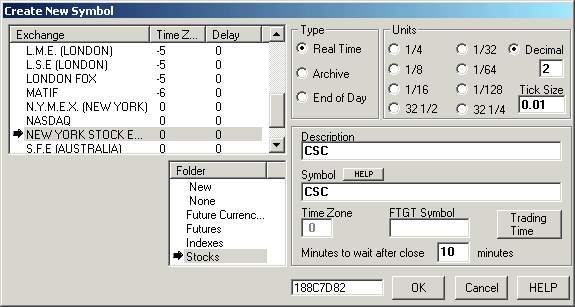
Select the Exchange, the program will know the IB code of the exchange or check the Edit Exchanges window to check this parameter. Select Stocks on the Folder, for IB always select Futures, Indexes or Stocks then FT will know if needs to use STK, FUT or IND for the symbol. Then on this case FT will create the symbol CSC and will do the correct connection with IB using CSC^STK^SMART
For the S&P Mini use the Future Groups, click on File, Futures, then on New Futures Group.

FT will create the symbols ES^FUT^GLOBEX^200303 , ES^FUT^GLOBEX^200306, ES^FUT^GLOBEX^200309,.......
Since 1992