
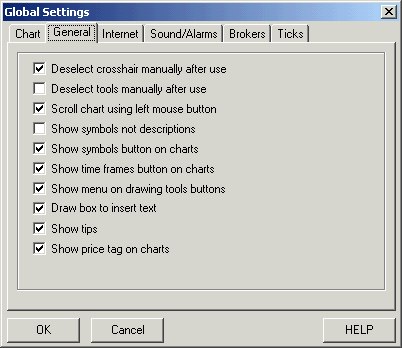
Global Settings Window

- Deselect crosshair manually after use: when checked cross hair cursor will remain until you choose another tool
- Deselect tools manually after use: when checked the current tool selected will remain until a different tool icon is selected
- Scroll chart using left mouse button: when selected the user can
scroll through the chart by holding down the left mouse
 button while
moving the mouse to the left.
button while
moving the mouse to the left. - Show symbols not descriptions: when checked the symbol will be listed in the title bar of each chart instead of the symbol's description
- Show symbols button on charts: when selected a small icon in the lower right hand corner of each chart labeled 'SY' will be displayed allowing the user to quickly changed the symbol for the current chart
- Show time frames button on charts: when selected a small icon in the lower right hand corner of each chart labeled 'TF' will be displayed allowing the user to quickly changed the time frames for the current chart
- Show menu on drawing tools buttons: when checked right clicking on any drawing tool drawn on a chart will bring up a pop up menu
- Draw box to insert text: when selected user must draw a box from left to right on the chart where text is to be inserted
- Show tips: hovering the mouse cursor over a button will give you a description of that button.
- Show price tag on charts: when checked the current price will be displayed next to the live arrow.
- Show the alarm in an individual window: when an alarm is triggered notice of it will be displayed in a separate window.
- Show the alarm in the alarm list window: when an alarm is triggered notice of it will be displayed in a window that contains all currently set alarms.
- Sound Alarm: when checked a sound will be played when an alarm is triggered. Choose between the standard beep sound or a customized sound
- Real Time Tick Sound: when checked the computer's speaker will beep each time a tick is received by the program. This can give the user a sense of how active the market is.


* Trading any market carries a high level of risk, and may not be suitable for all investors. The high degree of leverage can work against you as well as for you. Before deciding to invest you should carefully consider your investment objectives, level of experience, and risk appetite.
* The possibility exists that you could sustain a loss of some or all of your initial investment and therefore you should not invest money that you cannot afford to lose. You should be aware of all the risks associated with trading, and seek advice from an independent financial advisor if you have any doubts.
* The Views and opinions represented in the provided website links and resources are not controlled by the Referring Broker or the FCM. Further, the Referring Broker and the FCM are not responsible for their availability, content, or delivery of services.
* You should be aware of all the risks associated with foreign exchange, futures, stocks, options, Cryptocurrencies trading, and seek advice from an independent financial advisor if you have any doubts. We do not offer any advise and trade using our software is at your own risk.
Home | Privacy Policy | Contact Information
Copyright © 1996-2020 PAS Inc.
All names mentioned in this
document are trademarks or registered trademarks of their respective
owners.