System Options Window
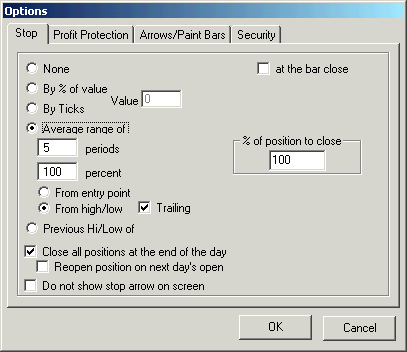
None /span>- No stop will be used.
By % of value - the stop is calculated on the entry price +/- a percentage of the entry price. If you bought a stock at 100 and you have By % of value 10, then if the price goes back to 90 the system will go flat (i.e. 100-10% = 90). Click on the Trailing check box to make this stop be a trailing stop.
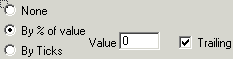
By Ticks - you define how many ticks you will allow yourself to loose. For example, if you are long the S&P Futures (tick size is .10) and you have “By Ticks” = 20 then if the position looses 2 points then system will go flat (i.e. 20 x .1 = 2). Click on the Trailing check box to make this stop be a trailing stop.
Retracement from high profit - Some more explanationSuppose 22 ticks is your target to start to check for a Retracement from high profit
Suppose 22 ticks is your target to start to check for a Retracement from high profit
Suppose you get the 22 ticks profit.
Suppose you have Retracemnt from high profit box checked and the value 4%, then 4% of retracement of the profit is 22*4% = 0.88
That means if you loose 0.88 of your 22 the program will go flat. That is at 22 - 0.88 = 21.12
Suppose the market goes to the 22 and go in your favor never going against you the 4%, let says it goes until you have 100 ticks profit, then at 100 ticks 4% will be 100*4% = 4, then if the market retrace and your profit goes back to 100-4 = 96 then you go flat.
Note that if you put 0 (zero) on the % retrace the program will wait the 22 points, if the market goes in your favor it will not go flat, lets say you get 25 ticks profit then the price moves against you by 0.00000001% making the profit go from 25 to 24.99999999999, then you will go flat.
If you want the 22 just as a target, if profit is 22 then go flat, no matter what, then DO NOT have the option box profit retracement checked.
Average range of - the program calculates the average range of “n” periods ago and then multiplies “n” periods by a percentage. Lets assume that the average range of the last “n” periods is 10 and the percent is set to 90, the program will use the number 10 and multiply it by 90% which gives you 9. If you use the option “From entry point” the program will add or subtract from the trade price the value 9 which will be your stop. For example, if you buy at 100 your stop will be 100 - 9 = 91. If you use the option “From high/low” then the program will use the high or low of the bar from which the trade occurred. For example, if you bought at 100 on a bar that had a low of 99 then the stop is 99 - 9 = 90. If the option “Trailing” is selected then when a new bar opens this bar’s low will be used as the stop as long as it has a higher low then the previous bar. Using the previous example your stop was 90. If a new bar opens and that low is 98, the new stop would be 98 - 9 = 89.
Previous Hi/Low of - here the stop will be the hi or low of “n” periods ago. If you select “trailing” then as a new higher low or lower high of n periods ago are formed then the stop will move to that value.
% of position to close - Set the percentage of the position that will close at the stop. Example, if you are long in 4 contracts, and set this option to 50 as the stop is hit only 2 contracts will be closed, the other 2 will continue open.
at the bar close- f this option is on as the stop is hit intrabar the position will not close, it will close on at the close of the bar.
Do not show profit protection arrow on screen - the program displays a profit protection arrow on the screen to show where the profit protection is on the chart. If you select this option the arrow will not be shown.
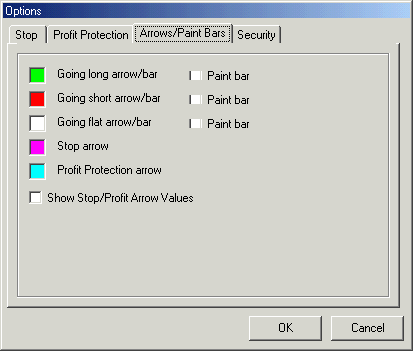
In the window above you can select the color you want for the bars and arrows that will appear on screen when the system is in use.
The paint bar check boxes will cause the bars to be painted using the color selected. For example, if the system happens to go long and the going long color is green then the price bars will turn green and stay green until the system reverses or goes flat.
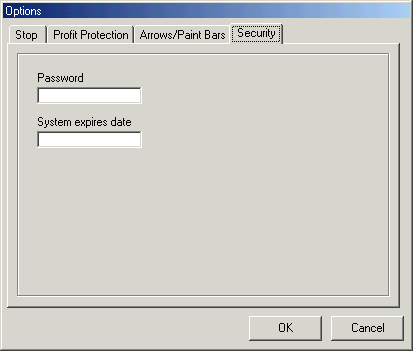
Use the security tab to password protect your system.
To have access to the system's parameters the user must have the password.
The 'System expires date' will make the system expire on a predetermined date.
Since 1992