Scale Window

CONTROL-L hotkey
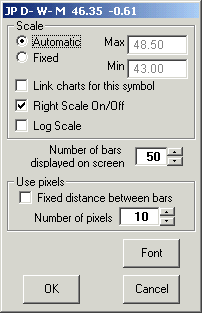
To access the Chart scale click on the scale button or right click on the chart scale area on the right of the chart. You can also right click the chart, click chart then scale. Using the keyboard press CONTROL-L.
Use the scale window to set the active chart's scale to automatic or fixed. The link charts box will link all open chart windows that have the same symbol. This feature is useful when you want to go to a certain bar in a chart. Going to any bar on one chart will cause all other chart with the same symbol to automatically go to the same bar.
You can also turn the right scale off as well as change the scale of the chart to log which is useful for higher time frame charts spanning long time periods (i.e. a multi-year monthly chart).
If you want the chart to display a certain number of bars select the desired number next to 'number of bars displayed on screen'. The maximum number is 1000.
Finally, if you want there to be an exact distance between bars place a check mark in the 'fixed distance between bars' box and select the number of pixels.
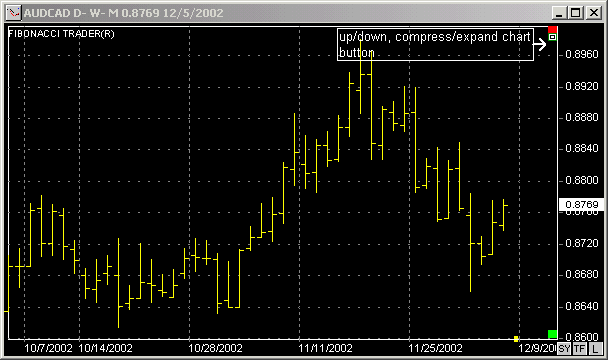
You can move the chart up or down, or expand or compress the chart, for that click on the small button that has a square inside it shown on the picture bellow.
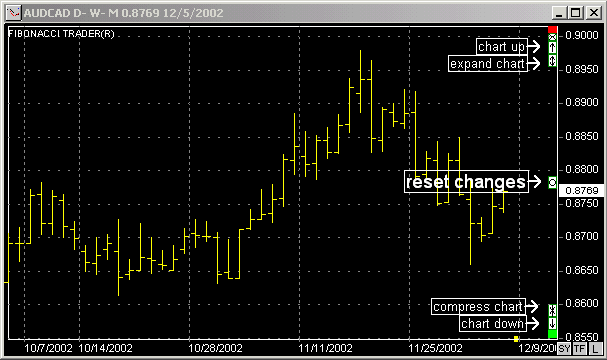
When you click that other small buttons will appear on the chart, the next picture shows these buttons, note that the center button will reset any change on the chart scaling. If you click the small button that has the small square inside it once again that will close the other buttons.
Since 1992